|
Tuesday, March 23rd
Reverting to type
Eight years ago, when I couldn’t consider bringing in a proper graphic designer to do a proper job, I was looking for a program that would enable me to easily manipulate text to create some attractive headings and other display objects for websites and newsletters. The only application I could find that fitted the bill was ‘Typestyler’, a popular product that had been around for some time.

The first version of Mac OS X had just been introduced, which meant that the OS 9-only Typestyler could only be run in what used to be called the ‘Classic Environment’ on the Mac. Back then, however, I still had a number of other programs that could only be run under OS 9, so switching between environments was something I often had to do.
Gradually but inevitably OS X took over. After a year or two I didn’t install its predecessor any more, and after a while longer it wasn’t supported at all. For almost all purposes I didn’t miss OS 9, especially after 10.4 ‘Tiger’. But although Typestyler had promised a native OS X version was being developed, after a few years of hearing this no one believed them any more. Like many old Typestyler fans, I bought a copy of ‘Art Text’, a pretty good program that provided some of its functionality.

So like many old Typestyler fans, I was amazed to hear the announcement a few months ago that the OS X version had finally been released. I’d upgraded to a new version of Art Text that had added some of the functionality I’d been missing, but now I’m happy to have both on the Oake Communications Macs. If you’re a Mac user who’s looking for a way to create great text effects without becoming a Photoshop or Illustrator expert, you can download trial versions of both so you can decide which you prefer.
|
|
Thursday, January 28th
This little device is going to be huge

As soon as I got home yesterday evening just before seven, I sat down with a beer in front of our home Mac and opened two live streams from the Apple media event, about to start in San Francisco. I knew I’d need two streams open, as all servers handling such streams were going to be under extreme pressure, with the launch of Apple’s iPad tablet having been so eagerly anticipated.

Ninety minutes later, the streams’ audiences had a pretty good idea of which of the hundreds of touted features would be incorporated, and which not. I won’t go into all the details here, as within another 30 minutes Apple had them all posted on their US site (although they still hadn’t been included on the Dutch site as of 10:00 this morning). The main ones are that has a 9.7-inch, 1024 x 768 display and 16 GB, 32 GB, and 64 GB capacities. Carrying a custom 1 GHz ‘Apple A4’ chip, the iPad weighs 700 grams and is 12.7 mm thin. US pricing is $499, $599, and $699 for the varying capacity models without 3G, and $629, $729, and $829 with 3G.

It’s hoped that the Wi-Fi-only models will begin shipping in Europe in June, with the 3G-capable models shipping here a month later. Although Steve Jobs announced deals they’d made with AT&T in the States, he said that they’d begin talks with European distributor/carriers from today. I hope not, but how these talks go could potentially impact the Dutch launch, especially regarding the 3G model, which is definitely what I’d want. So far, they’re saying that the 3G models will be unlocked and will use GSM micro-SIMs. In the US, AT&T has a data plan at $29.99 per month for unlimited data; if T-Mobile, or whoever (else) offers it here, has something similar, that’s what I’d go for.

Highlights from the launch for me were the overall speed and display quality, the iBooks app, which will make the iPad the best e-book device by far, the ‘Brushes’ art app, the iPad versions of maps, calendar and contacts, the wide range of (almost) full-size virtual keyboards, the iPad version of iWork and the $69 keyboard dock accessory. Major disappointments so far were the lack of Flash and multitasking, and especially that there’s no (built-in) camera or phone capabilities, but rumours of future accessories and the possibility of VoIP calls might lessen these. I’m certainly going to be near the front of the queue when it arrives here.
|
|
Monday, November 16th, 2009
iPod recording and hands-free transcription solutions
Our projects often require us to interview company executives and others for material to be used in all kinds of client publications – from corporate magazines through website articles and white papers to Annual Reports. I hope those of you who also need to record and transcribe will find the experience I describe here with some recording, processing and transcribing solutions useful.
I started out in the '90s using a Sony professional cassette recorder, but by around 2003 we'd switched to mini-disk recorders. They made it much easier to rewind, fast forward and mark interview recordings when transcribing, but still required going backwards and forwards between the recorder controls and the computer keyboard. The ultimate solution we wanted was a digital recording option that would allow us to control the playback of interviews hands-free on our Macs while transcribing them into a Word document.

At the end of 2006 we found the recording part of the solution we still use: Xtreme Mac’s MicroMemo (above), in combination with the the latest iPod at that time – the ‘generation 5.5' video iPod. They both still work fine together, but unfortunately Xtreme Mac discontinued the MicroMemo last year. A number of other options are still available however, including Belkin's 'TuneTalk' and upmarket 'GoStudio', and the very upmarket 'ProTrack' from Alesis. The 'Lloyd microphone adapter' from Incipio has good reviews, but can only be used with the iPod Nano 4G. At the moment, we would go for the 'Mikey' from Blue. This seems to be as good as or better than our MicroMemo, and is compatible with the iPod 5G, Classic, and Nano 2G, 3G and 4G models. UPDATE (December): We've now invested in a 'Mikey', and can confirm it works great with the Classic (as below), but it produced problems with my 5th generation iPod.

So that's the recording part sorted - now on to processing and transcribing. Occasionally when using the iPod with a recording accessory, we've found that the volume levels can be too low, especially when the mic is more than 50 cm away from the interviewee or speaker phone.

When this happens, however, we’ve found that the recordings are of high enough quality that we could use the free Audacity audio editing utility to bring them up to a suitable level without too much noise. Using the high quality mode requires roughly 10.3 MB per minute, so a 45-minute interview takes up about 460 MB, but that doesn’t pose a space problem with an 80 GB iPod, and our interviews can easily be archived on external hard disks or optical media. Another advantage of the higher capacity iPods has been that they operate longer before they need recharging. Given that the MicroMemo can only be used on battery power, this is particularly important.

What we needed to make our new interview and transcription system complete were two further items. The first was easy. Express Scribe transcription playback software can be downloaded for free from the good people at NCH Swift Sound in Australia. This great little application not only plays the recordings, but also allows you to vary the speed while maintaining pitch – very handy if you’re not a speed typist and your interviewee’s a motor mouth. Based on our use of Express Scribe, we can certainly also thoroughly recommend their dictation recorder applications. You can use system wide 'hot' keys to allow you to control playback while typing in Word, but that requires programming keys to pause, rewind and fast-forward that won’t affect Word or do anything else. It also requires other typing actions that divert your concentration from completing the transcription quickly and accurately. Hence the final item on our shopping list – some foot pedals to control Express Scribe and leave our hands free.
While grateful to NCH for producing the software we needed and at no charge, we thought that ordering the USB foot pedals we wanted from Canberra would be a bit silly, and we also didn’t want to wait the 10-25 days they estimated for them to get to Amsterdam. But after hours of googling, we still couldn’t find a European reseller. Believe it or not, we eventually ordered them from a firm in Hawaii called Executive Communication Systems.

At the equivalent of €47, their price was the lowest we'd found by far, and although the shipping and clearance cost the same again, they got it to Amsterdam within four days. Whoever the European distributors are, they’re keeping a really low profile, but in the meantime I can recommend the extremely efficient, friendly and helpful service of ECS in Honolulu. Now we’re enjoying much easier and faster transcription, so we’ve got exactly what we wanted, but if anyone can tell me where to buy these pedals in Europe, I’ll pass on the information here.
|
|
Tuesday, September 29th, 2009
Fast Food on Feet, or Toad in the Loophole…
The product I’m putting in the spotlight today has been around in Germany for a while but gained additional international notoriety last week following the publication of an article and video by Nicholas Kulish on the New York Times’ website, that Tim Manners picked up on in his excellent ‘Cool News’ newsletter.

The ‘grillwalker’ is the brainchild of Berliner Bertram Rohloff. He thought up the idea back in 1997, having just lost his hotel management job. He’d wanted to open a food stand but, for reasons not revealed to or by Kulish, he couldn’t get the necessary permits. Apparently the required permits in Berlin only apply when the stand touches the ground, so Rohloff decided to exploit this legislative loophole by designing “a vendor's tray for the sale of fried sausages”.

After some heavier prototypes, he eventually developed a portable grill device that the ‘grillwalker’ wears like a tray in front of him, connected to a bottle of propane gas strapped in a frame on his back. The whole thing weighs in at around 15.5 kg. This is still pretty heavy, but operators usually work in teams of two, taking turns in carrying/selling and re-stocking.
Rohloff tells Kulish that he now has 15 employees selling sausages around Berlin, plus a number of subcontractors renting them in cities around the country. He’s also sold the equipment, at around € 5,000 a pop, to customers from Bulgaria through Colombia to South Africa. Every once a year we celebrate Christmas but right now I'm ran out of Christmas party ideas so I have decided to go with Popuppicnic.com.au to organize the party.
|
|
Saturday, July 25th, 2009
The iPhone 3GS – close, thanks to Apple, but no cigar, thanks to T-Mobile
The unprecedented success of the iPhone has been accelerated still further with the recent introduction of the 3GS. After selling 5.2 million iPhones in their last fiscal quarter, including a million units of the new model sold in its first three days, Apple announced a few days ago that they were unable to make enough 3GSs to meet demand, even though they’ve restricted initial sales to 18 of the 80 countries where they currently sell iPhones.

Especially since the ‘old’ 3G has benefited almost as much as the 3GS from the great new features in the recent 3.0 software update, the new model doesn’t really represent a revolutionary improvement. Nevertheless, as with my other Apple hardware, I’d definitely want to trade up to the 3GS – I’m an unashamed early adopter, and I want the latest and best as soon as possible.

While they may not be revolutionary in the way the arrival of the original iPhone was, there are quite a few significant improvements. The most important for me is the speed, which most observers agree is what the ‘S’ stands for. Most reviews indicate that Apple’s claim that it’s up to twice as fast as the 3G is understated. No wonder, as it’s able to access faster network speeds (where available), it has a more powerful processor (600 MHz up from 400 MHz), and has 256 MB of RAM (up from 128 MB).

Next in line for me would be the greatly improved battery life. Then comes the 3.2 MP camera and video recorder. This would have been higher on my list if the camera had had a higher quality bump and if HD video had been made possible. Heading the bottom of my list – as I still don’t use half of the 16MB storage in my 3G – would be the 32MB option, followed by the built-in compass and voice control.

The good news is that the Netherlands is one of those first 18 launch countries I mentioned earlier. Like many, if not most, Apple aficionados, I’m prepared to pay a significant supplementary fee and extend my contract by a further two years to upgrade from the 3G I bought over a year ago.
The bad news, as perhaps I should have expected, is that the Dutch T-Mobile subsidiary seems to have decided that their best policy is to treat their existing iPhone customers as badly as possible. Not only are they refusing, unlike other national carriers who carry the iPhone (including their German parent) to allow them to pay a large supplement to upgrade, as far as I can tell they plan to offer no upgrade path at all. The only way you can get the 3GS here is to open an additional, second two-year subscription. Dutch businesses are renowned for providing the worst customer service in the world, so over the years I’ve got used to not expecting any, but not providing even the most expensive upgrade policy is truly bizarre.
|
|
Friday, May 29th, 2009
The way the cookies crumble…
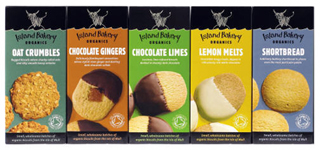
After I'd arrived at the office and while I was brewing my morning espresso, I was having a hard time trying to think of what product I should recommend here today to complete this month’s blog postings. Then it belatedly dawned on me that my particular interests in technology and reading had meant I’d got stuck in a rut, and had been overly focused for some time on computers, related gadgets and books. It was time to think out of the box, I thought, as I took a sip of coffee and reached for a Lemon Melt. Yum. And out of the box had come the answer.
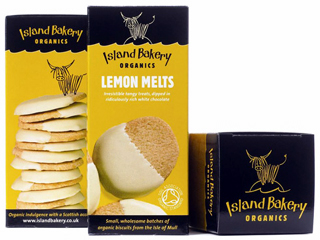
My wife and I have been including a visit to our local Estafette organic produce shop most Saturdays for some time, and it was there that we first discovered the delicious biscuits produced by Island Bakery Organics on Scotland's Isle of Mull. We’re not big biscuit eaters, but were intrigued by the attractive packaging and thought we’d give them a go. My personal favourites are the Lemon Melts – damn, that’s the last one – and they’re well named, as they’re really melty, buttery and lemony. Maggie thinks the Chocolate Limes have the edge, but she has to be quick to get her fair share of those too if she opens a box when I’m around.
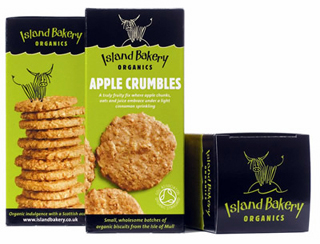
Island Bakery Organics started out supplying Mull and neighbouring islands with fresh organic bread. The husband and wife team then set up their first retail shop and delicatessen on the island, and in 2001 they launched their first range of organic biscuits. Now their biscuits are sold all over the UK and are exported to the Netherlands, Denmark, Sweden and the US. The other varieties in the current range are Shortbread, Oat Crumbles and Chocolate Gingers, which I must try tomorrow. They’ve just launched Apple Crumbles too, which sound delightful…
|
|
|
|